“In this post we analyze how Picus, leverages the MITRE ATT&CK framework to simulate cyber-attacks and strengthen your organization’s defenses.”
ATT&CK is used to identify security risks, plan security improvements and processes, and verify that defenses are working as expected against the actions an attacker might take to achieve its goal. The relationship between tactics and techniques is visualized in the ATT&CK matrix, which makes it easy to identify the methods used to compromise the network in a successful attack.
Tactics represent an attacker’s goal to accomplish an action, while techniques represent “how” an attacker achieves a tactical goal by performing an action. Tactics include events such as discovering information, moving laterally, executing files, and exfiltrating data, while techniques can be thought of as the processes and methods to accomplish these events.
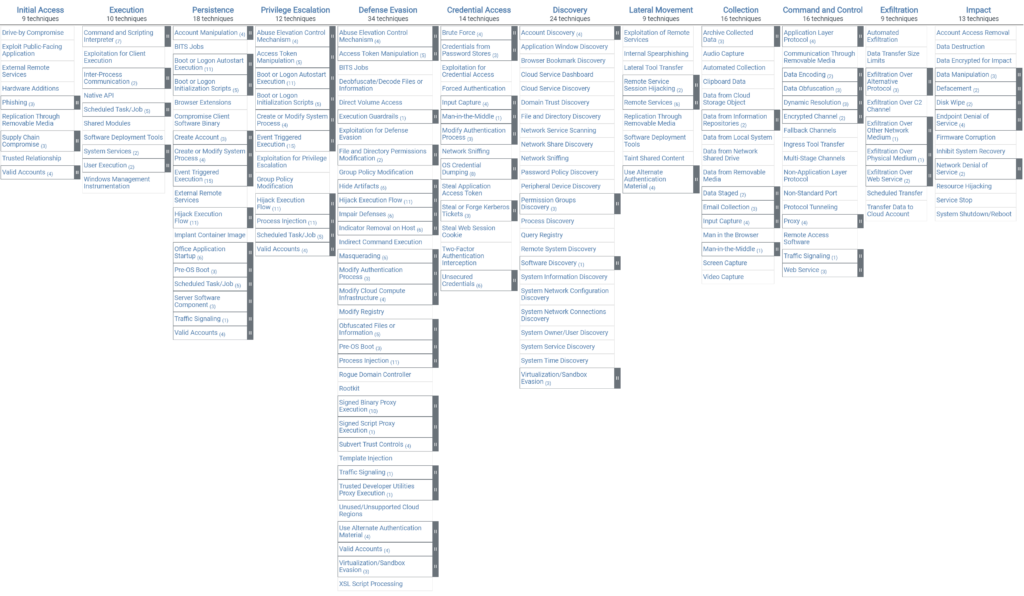
The image below shows an example of the ATT&CK matrix, which is a matrix of different cyber-attack techniques sorted by different tactics. Each category is divided into specific sub-categories corresponding to each type of attack and contains details, examples, and references related to the technique. This snapshot therefore only shows a small part of the matrix.
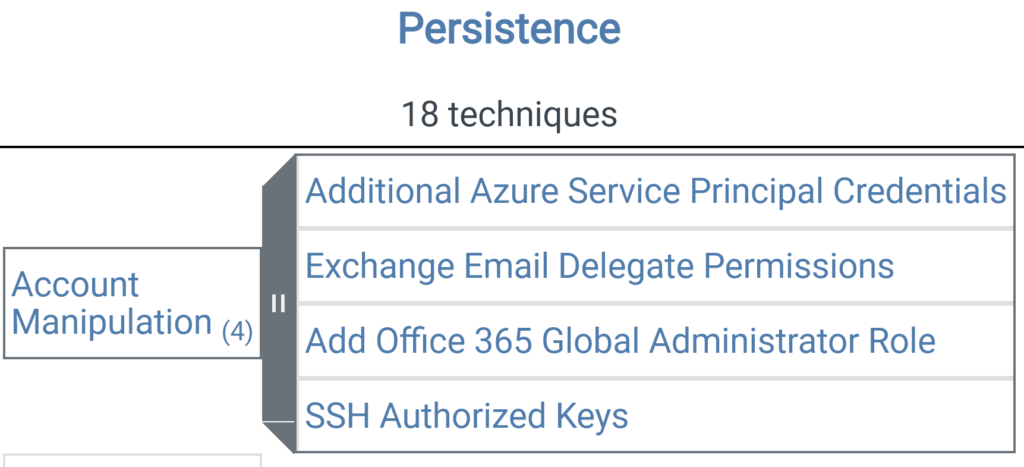
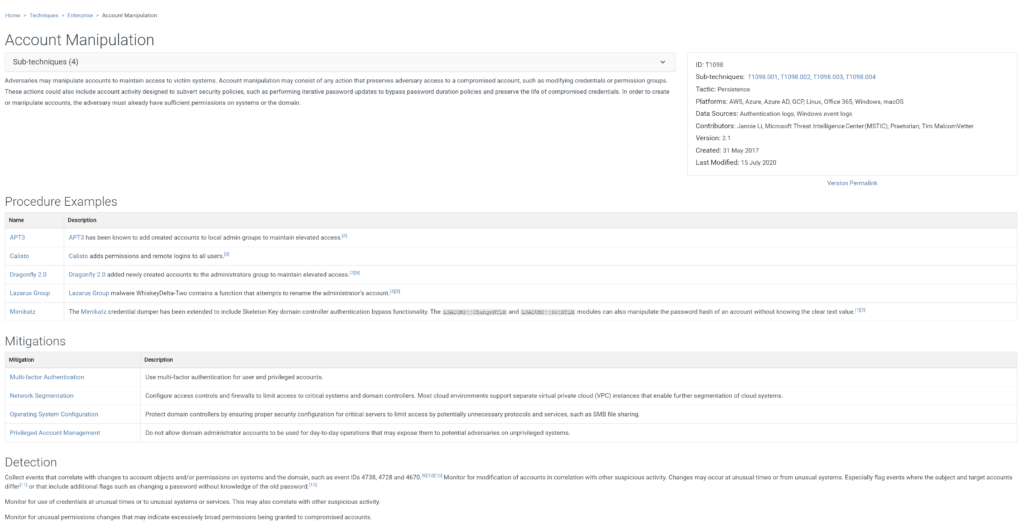
Clicking on any of the links to the techniques takes you to a page with a brief description of the technique, a list of example programs, and detection tips. For example, by selecting the Account Manipulation technique, details about this technique, mitigation recommendations, and detection tips can be viewed.
In addition to the “Enterprise” ATT&CK matrix, there are also “PRE-ATT&CK” matrices for pre-attack tactics and techniques and “Mobile ATT&CK” matrices for mobile devices. There are 12 tactics in the “Enterprise ATT&CK matrix”. These tactics are;
Using the MITRE ATT&CK matrix, organizations can view techniques and tactics from the attacker’s perspective and ask: How did the attacker penetrate? What actions did he/she take? What is the next step? They can easily find answers to questions such as. Analyzing attacker behavior is critical in identifying vulnerabilities and risks in the organization. Therefore, deficiencies in defense can be clearly seen and improvement processes can be planned accordingly. Information about the Picus security product, which provides users with an effective analysis using the MITRE ATT&CK matrix, is provided in the following article.
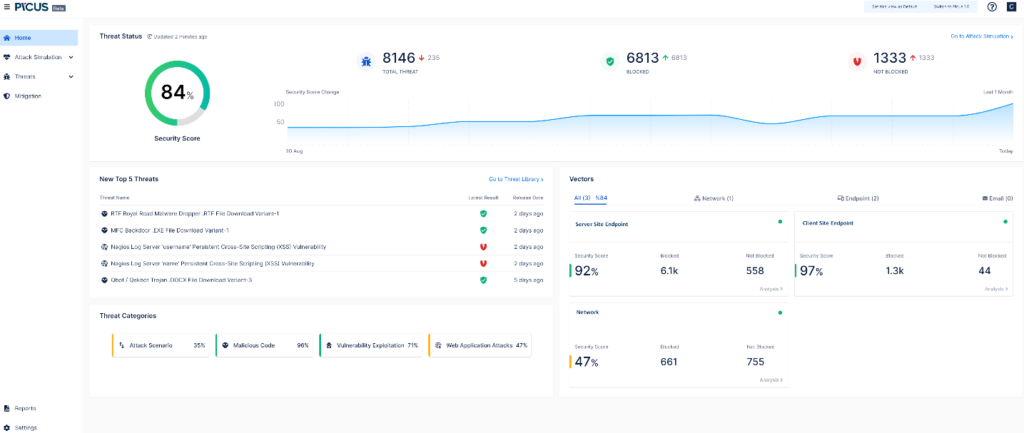
Picus is a security product that continuously questions the preparedness of organizations against emerging threats with attack simulations using real cyber threat examples. It identifies the strengths and weaknesses of security measures in real-time and makes recommendations in line with the results it obtains, ensuring the highest level of efficiency from the security products in the existing structure. Security score is determined by analyzing attack simulation results. Organizations are offered the opportunity to view and examine security levels separately for Endpoint, Network, and Email or attack categories so that organizations can focus on their weaknesses.
In order to simulate attacks with Picus, the attacker (attacker) and the victim (victim) need systems where Picus software is installed, these systems are called peers. The network path between the attacker and victim peer is called a vector. The peer and vector type should be determined according to the security product to be examined. For example, it is necessary to position the Network Peer to control security products such as Firewall, WAF; and the Endpoint Peer to analyze products such as AV, and IDR.
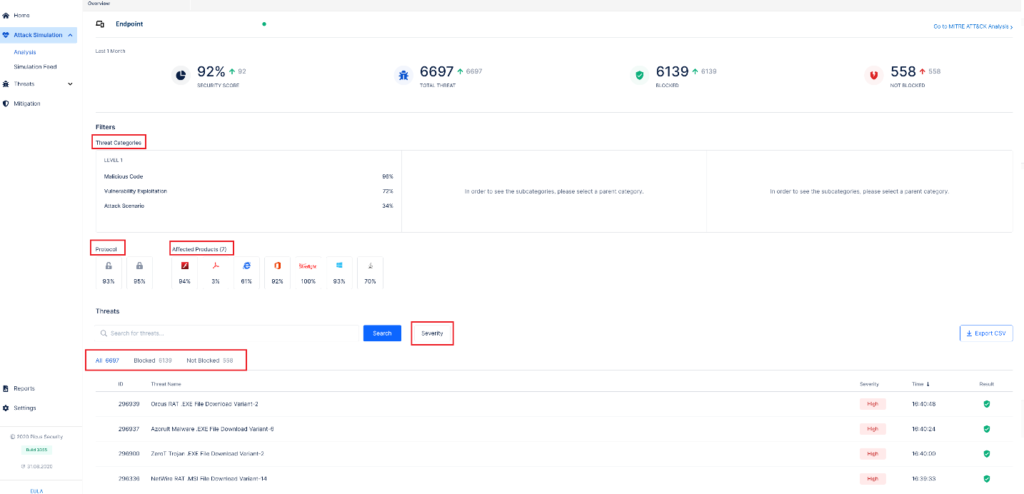
By selecting the relevant vector from the Attack Simulation à Analysis section; security score, and blocked and unblocked attack information can be accessed. It is possible to filter by threat category, affected product information, protocol (htp/https) type, and severity level.
In the BlackTech APT Group’s Plead Downloader scenario attack, first, a malicios dll is inserted into Explorer.exe, then a key is changed in the registry, a registry key is deleted using the command prompt, etc. All steps are shown in the screenshot below. This attack scenario behaves the same way on the endpoint peer positioned on Picus as it behaves in reality, and as a result of the simulation, the information about whether the existing steps can be blocked or not is distinguished according to the green and red icons on the right side.
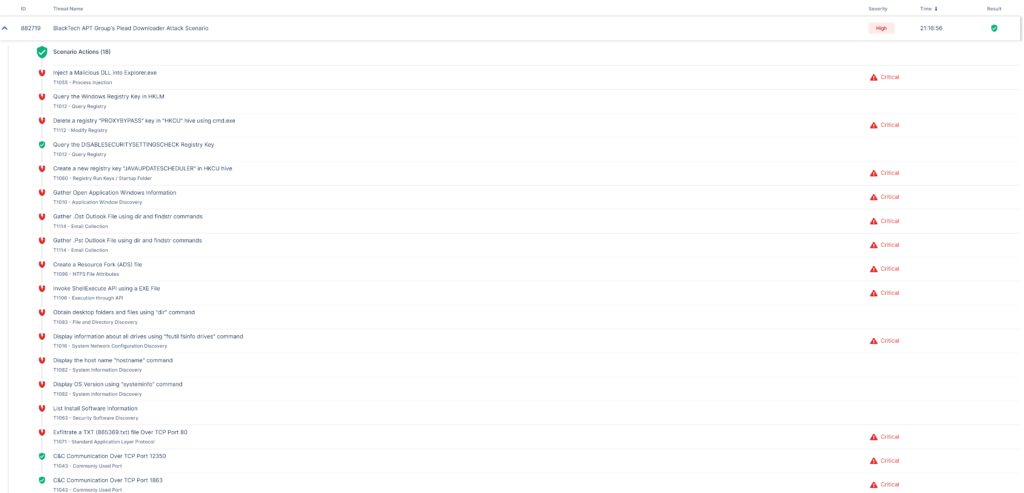
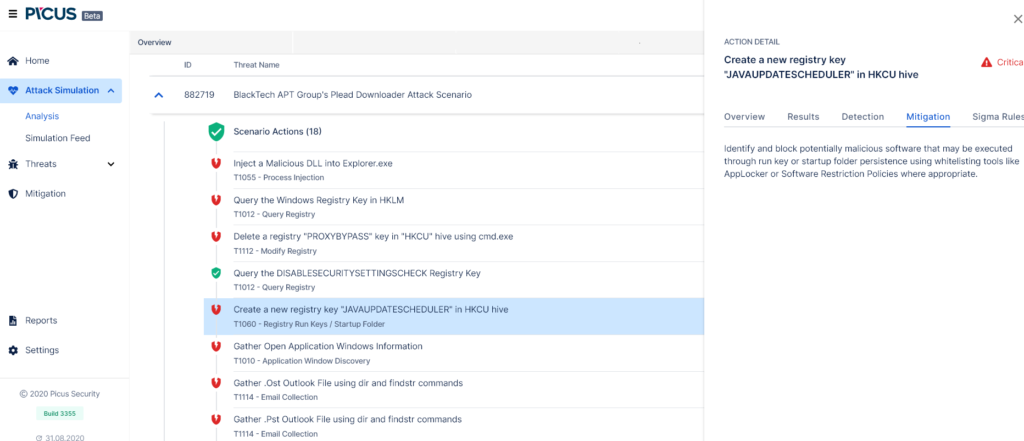
By examining all these steps one by one, the cause of the attacks that cannot be blocked should be determined and necessary improvements should be made by considering mitigation suggestions.
The results of the attack scenarios performed with Picus are shown in the MITRE ATT&CK table as technical and tactical according to the instant success rate. The table can be easily accessed by selecting “Go to MITRE ATT&CK Analysis” from the vector analysis page.
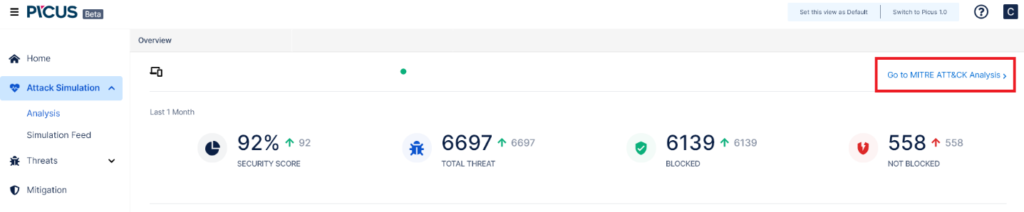
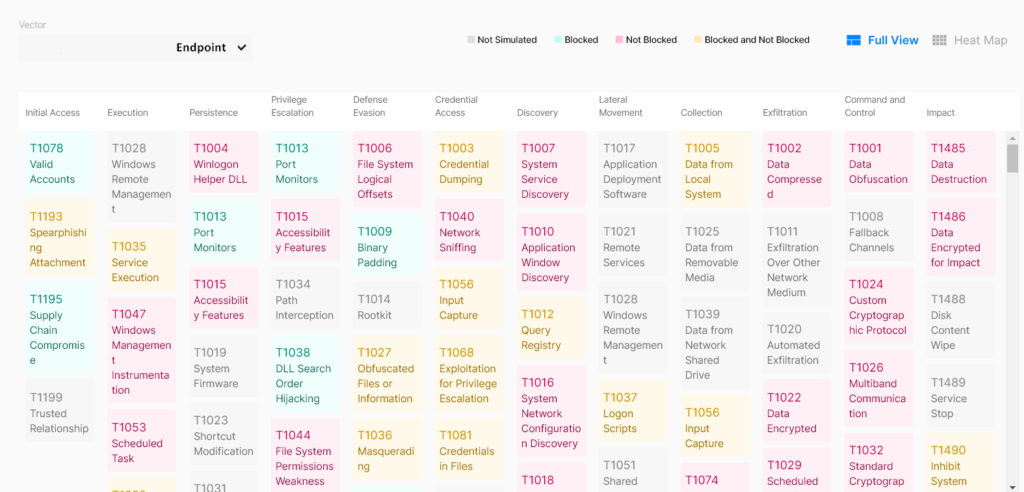
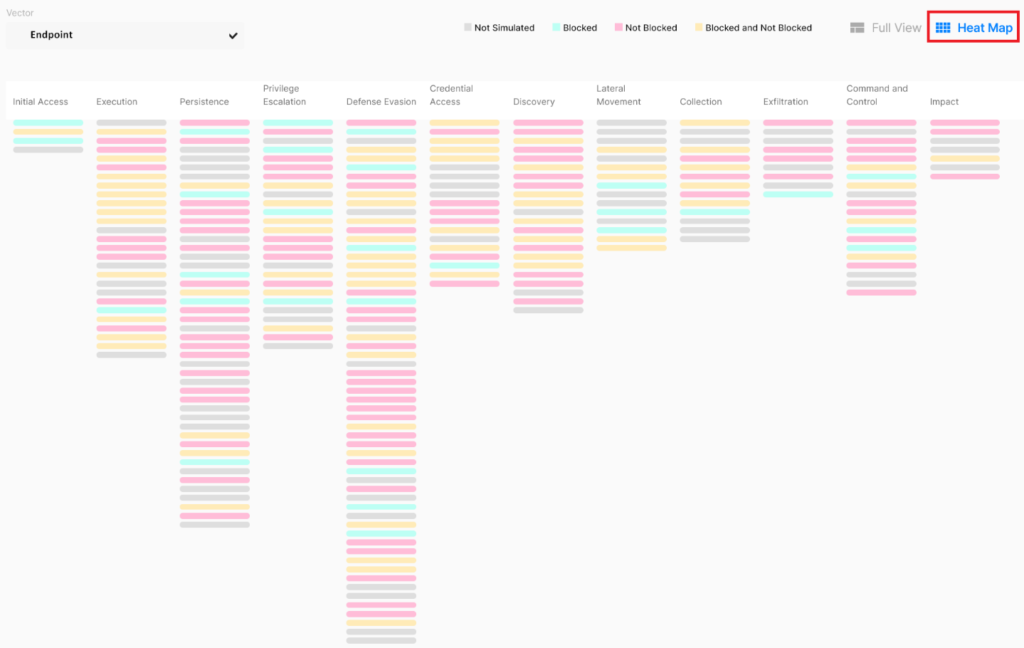
According to this table, it can be concluded that there is a high concentration of reds and therefore many unblockable attacks. The aim is to block the attack scenarios being played. Users can access the details of the techniques by clicking on the techniques. When the Read more on Mitre option is selected, the user can access detailed information about the technical details of that attack via https://attack.mitre.org/.
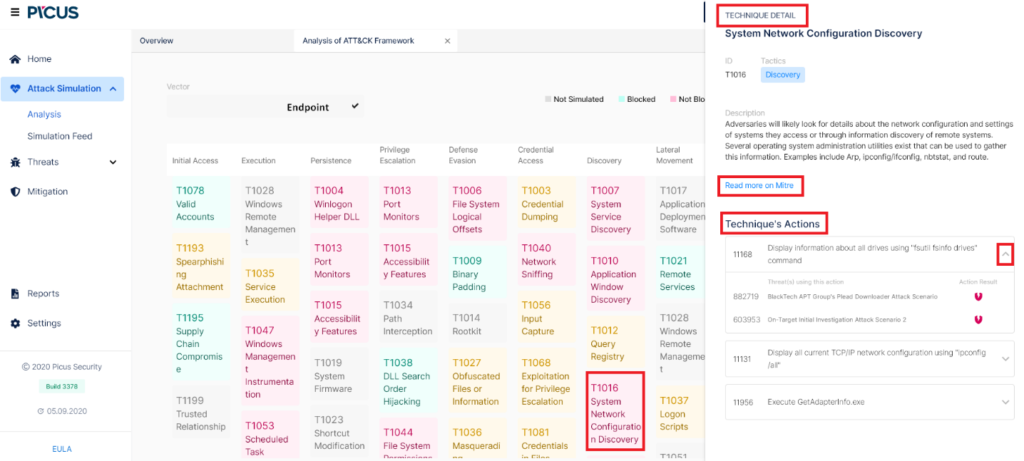
Technique’s Actions section lists the attack scenarios associated with these techniques. By selecting this scenario; information such as the description of the attack, attack category, affected systems and products can be accessed.
In the Heat Map section, the success rate can be viewed by looking at the table from a wide angle.
When improvements are made in the system by using the MITRE ATT&CK analysis table, when an attack is actually blocked, it paves the way for blocking all attacks that will use all the tactics and techniques in this attack. In other words, if the Mitre framework can be blocked, all future attacks that show known behavior patterns are automatically blocked.
Thanks for reading! Share this post if you found it helpful.


The rise of quantum computing introduces significant challenges to existing cryptographic systems.

In today’s post we’ll explain how to simulate Active Directory attacks using Splunk and various tools to improve an organization’s security posture.

In this blog post, we will cut through the confusion and explain the core differences between SIEM and SOAR, two essential security tools used to protect your organization.

The privileged accounts of organizations play an important role in today’s cybersecurity ecosystem. Protecting these accounts and the critical resources they access has become crucial for organizations to manage, control, and audit all privileged account activities.